
Why This Matters
Submitting time off correctly helps:
-
Avoid scheduling conflicts
-
Keep install and service schedules on track
-
Ensure proper technician coverage
-
Improve communication between field and office
How to Submit a Time-Off Request (Mobile)
-
Open the Zuper Mobile App
-
Tap the Menu (☰)
-
Select Timesheets
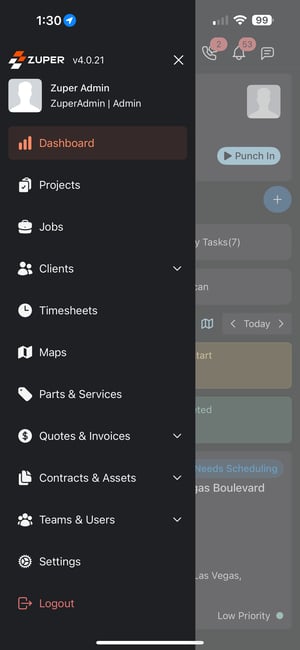
Step 1: Access Time-Off Requests
-
Inside Timesheets, tap the menu (three dots) in the top-right
-
Select Time-Off Requests

Step 2: Create a New Request
-
Tap the + (Add) button
-
Fill in the required details:
-
Start Date
-
End Date
-
Reason (Vacation, Sick, Personal, etc.)
-
Notes (optional but recommended)
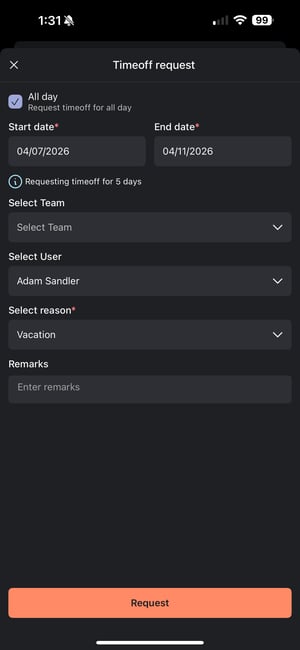
Step 3: Submit the Request
👉 Tap Request
Your time-off request will be submitted for approval.
Tracking Your Request
After submitting, you can monitor the status directly in the app:
-
Pending → Waiting for approval
-
Approved → Time off confirmed
-
Rejected → Request denied
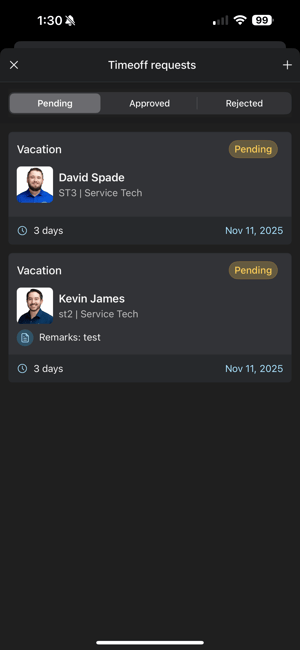
What Happens Next?
-
Your manager or admin reviews the request
-
They approve or reject it
-
You’ll be able to see the updated status in real time
Best Practices
-
Submit requests as early as possible
-
Add notes if the time off impacts scheduled jobs
-
Check approval status before making plans
Important Notes
-
Time-off requests directly impact scheduling and dispatch
-
Approved time off will prevent you from being assigned to jobs during that period
-
Zuper does not track PTO balances—this is handled outside the system
Summary
Time-off requests in Zuper keep your team aligned and your schedule accurate.
When used correctly, they:
-
Prevent scheduling conflicts
-
Improve communication
-
Keep operations running smoothly
Pro Tips
-
Always submit time off in advance
-
Check your schedule before requesting
-
Communicate with your manager if it’s urgent
What’s Next?
👉 Learn how to manage timesheets and time tracking to keep your workday organized.